
The default SSH login port 22 can be easily changed. The main idea behind changing the port is security though it is not a big deal but still it can protect against some automated attacks that target port 22.
Open the sshd_config file in vi or any other editor of your choice
sudo vi /etc/ssh/sshd_config
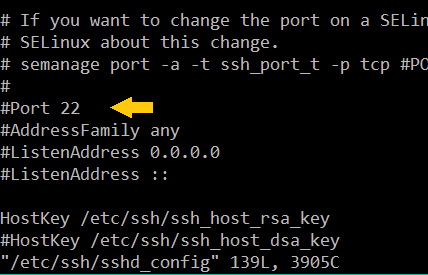
Change the line
# Port 22
Remove the # symbol and change the port number.
Port numbers from 49152 through 65535 are usually safe to use.
Restart sshd service
systemctl restart sshd.service
CentOs usually has selinux enabled by default. To check the status of selinux use this command
sestatus
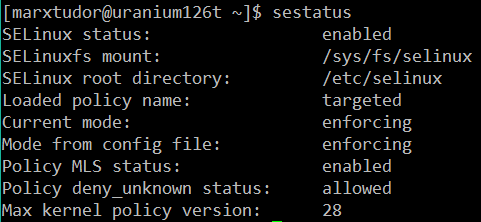
If it is enabled then add the custom ssh port number in selinux too.
semanage port -a -t ssh_port_t -p tcp 50001
Where 50001 is the custom port number replace it with the port number you assigned in the previous step in the sshd_config file.
Finally systemctl restart sshd.service
Leave a Reply